Pre-launch — MailSense Pro is in final stages. Join the early access list to be notified at launch.

MailSense Pro

Endpoint Email Security · Windows · Mac · Linux

See what's actually in your inbox.

MailSense Pro is a desktop email security analyzer for Windows, Mac and Linux. Forensic-grade inspection, AI-powered threat detection, and full local control — across Microsoft 365, Gmail, and IMAP. Your email never leaves your machine.
Windows · Mac · Linux Launching 2026 Local-only analysis
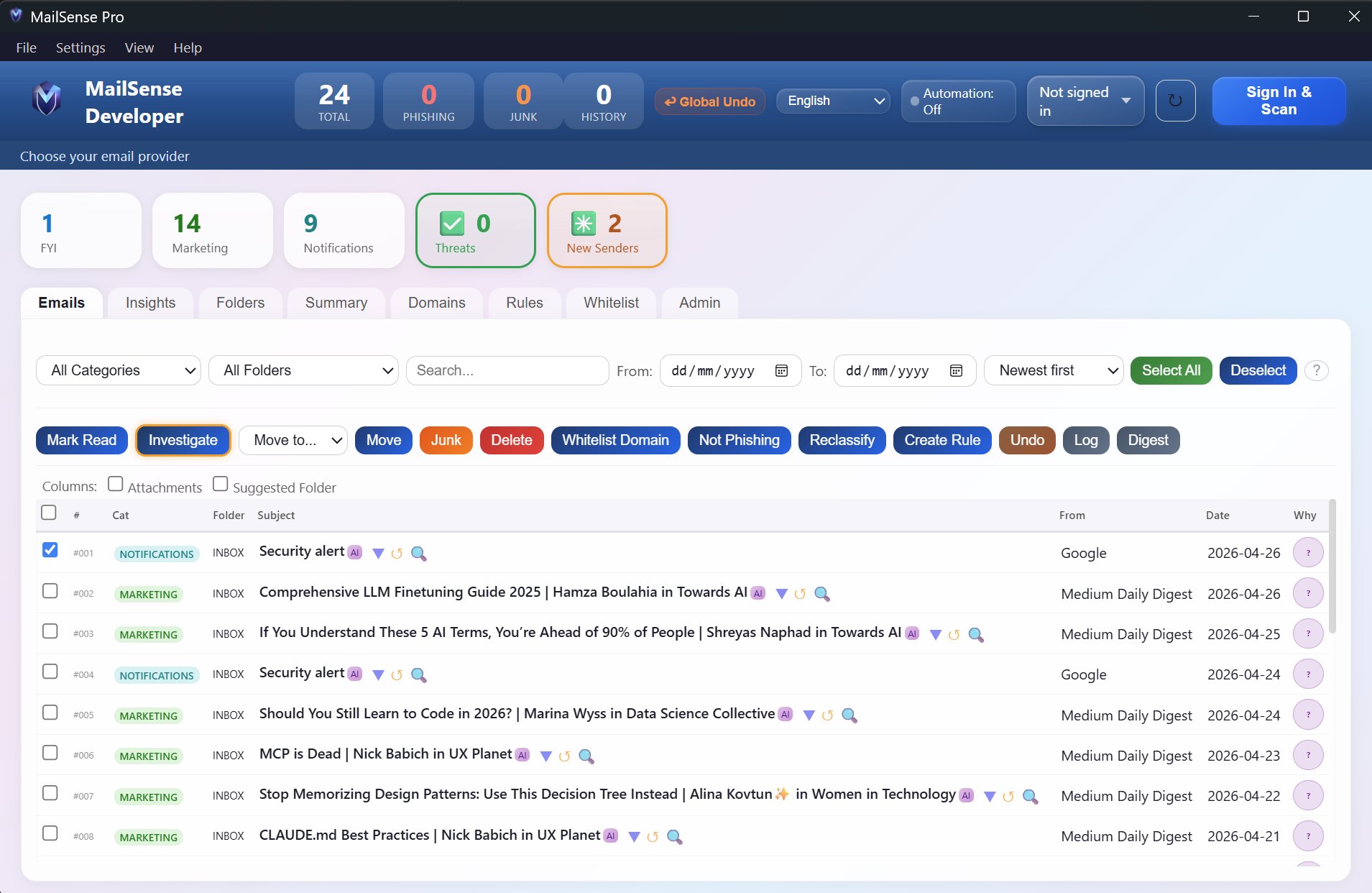
MailSense Pro main dashboard showing email classification
SAST & DAST hardened
Local-only analysis · No cloud upload
Full RTL support · Arabic & Hebrew
Microsoft 365, Gmail & IMAP

Built for analysts, designed for everyone

Every feature is designed around a single principle: show the user what's actually happening, then let them decide. No black boxes.

Threat Intelligence 1,187,472 phishing signatures

Four intelligence feeds, working in real time

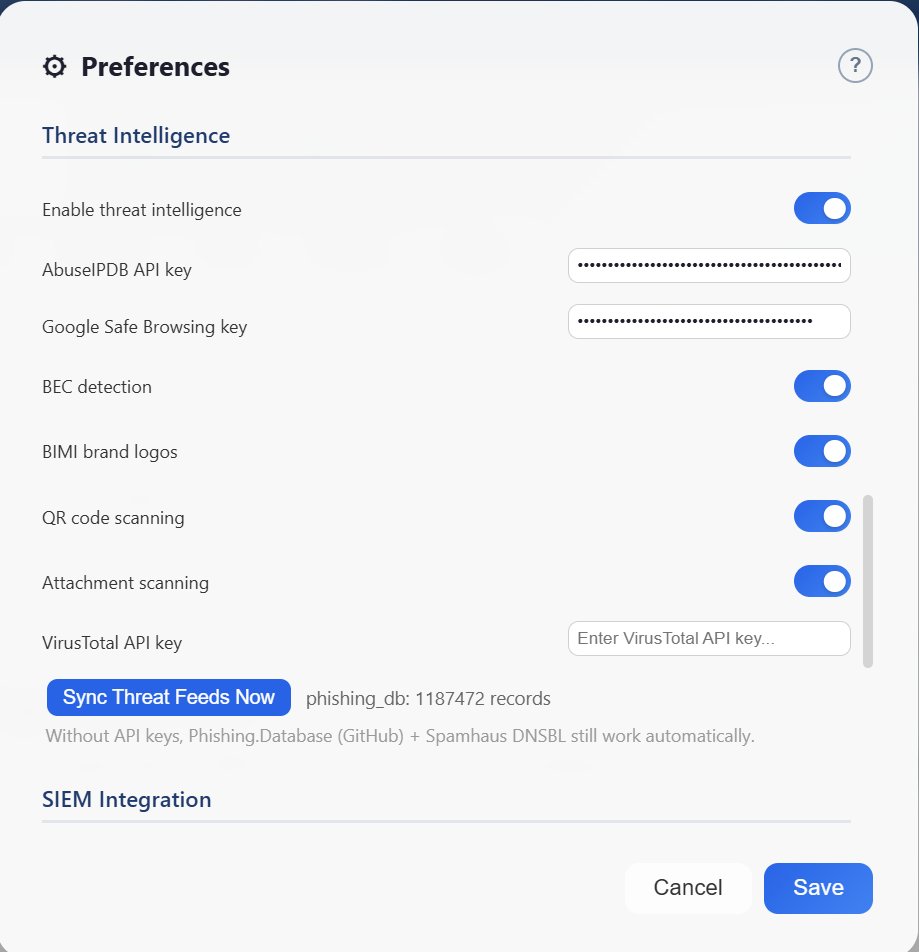
MailSense Pro cross-checks every email against Phishing.Database, Spamhaus, AbuseIPDB and Google Safe Browsing — plus VirusTotal for attachment hashing. No API keys required to start; the open feeds keep working out of the box.

  • BEC (Business Email Compromise) pattern detection
  • QR code phishing scanning
  • BIMI verified-sender logos
  • URL unwrapping across 26 shorteners
Threat Intelligence settings panel
Email Forensics

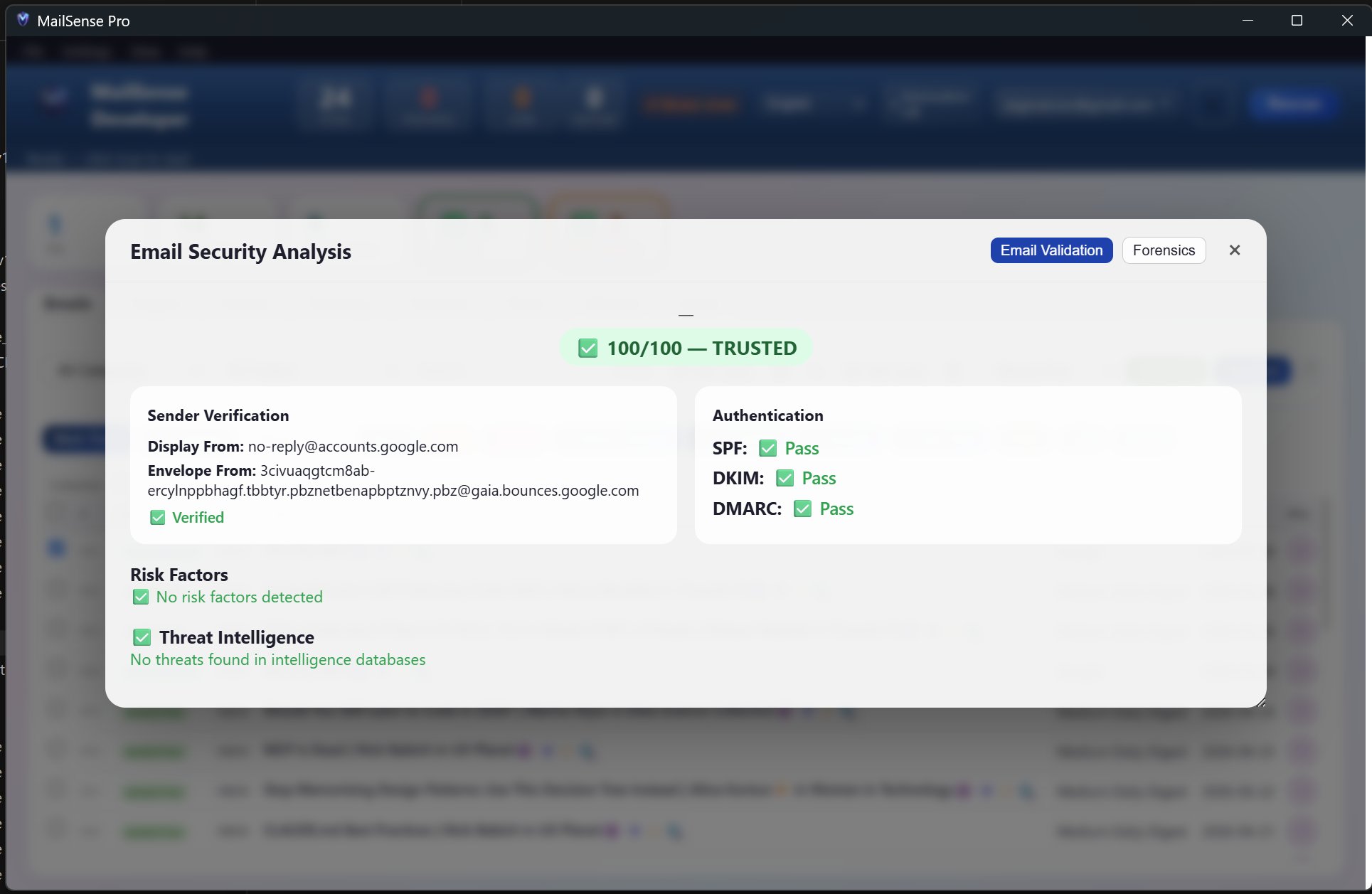
See exactly why an email is trusted — or not

Every email gets a 0–100 trust score with full reasoning. Sender verification, SPF/DKIM/DMARC authentication, relay chain mapping, IP geolocation, and lookalike-domain detection — surfaced in plain English and one click away from the raw headers.

  • Full relay chain with hop-by-hop geolocation
  • Levenshtein + homoglyph lookalike detection
  • Expandable raw headers with one-click reveal
  • JSONL audit trail for compliance
Email trust score with sender verification details
AI Recommendations

The AI explains. You decide.

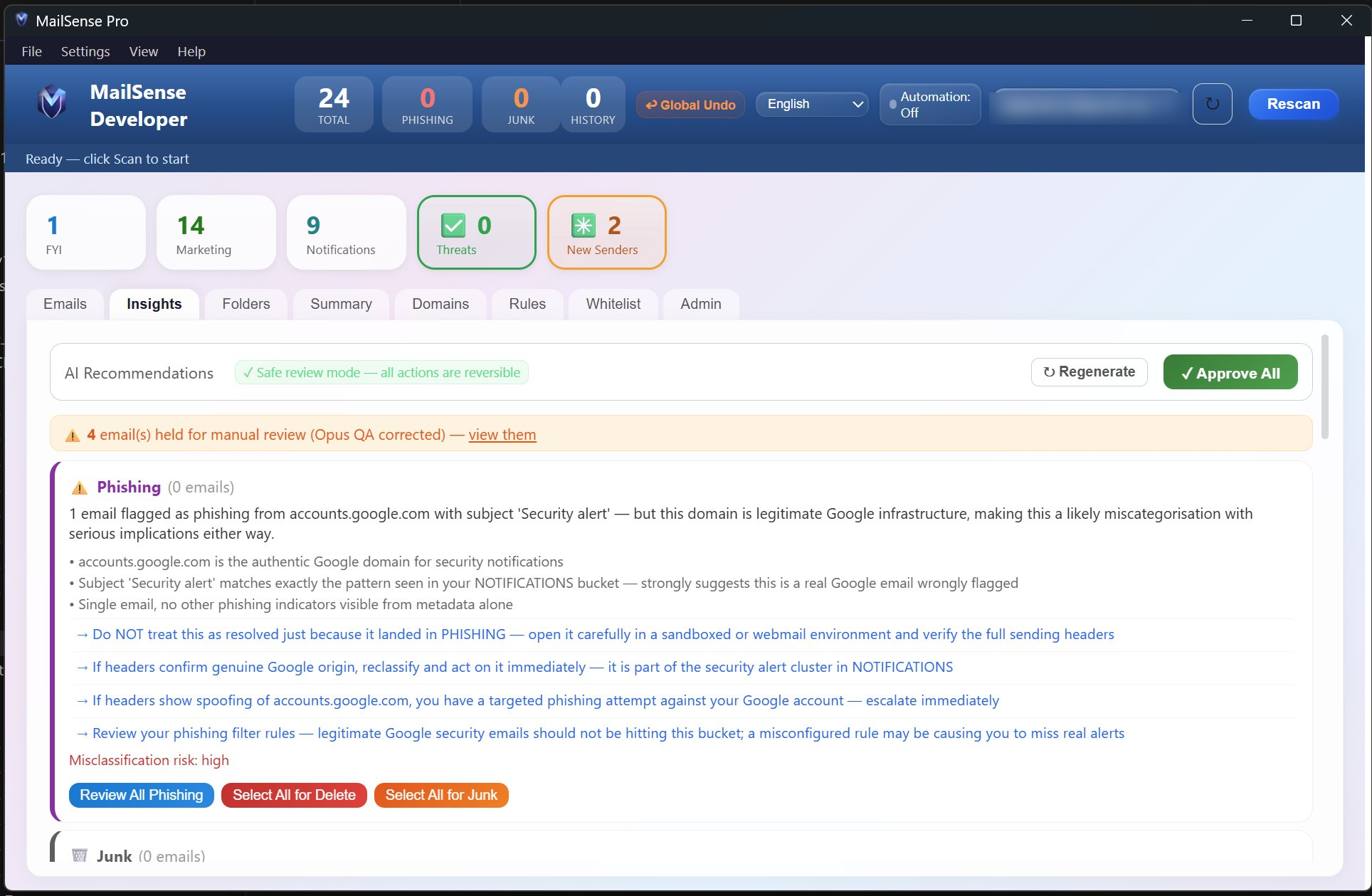
Anthropic's Claude models (Haiku → Sonnet → Opus, tier-routed for cost) review your inbox and produce reasoned recommendations — including misclassification flags. Every action is reversible, with safe-review mode on by default.

  • Plain-English reasoning for every recommendation
  • Misclassification risk flagged explicitly
  • Safe review mode — all actions reversible
  • Global undo across the entire session
AI Recommendations panel with phishing analysis
Smart Classification

Built-in business categories, fully customisable

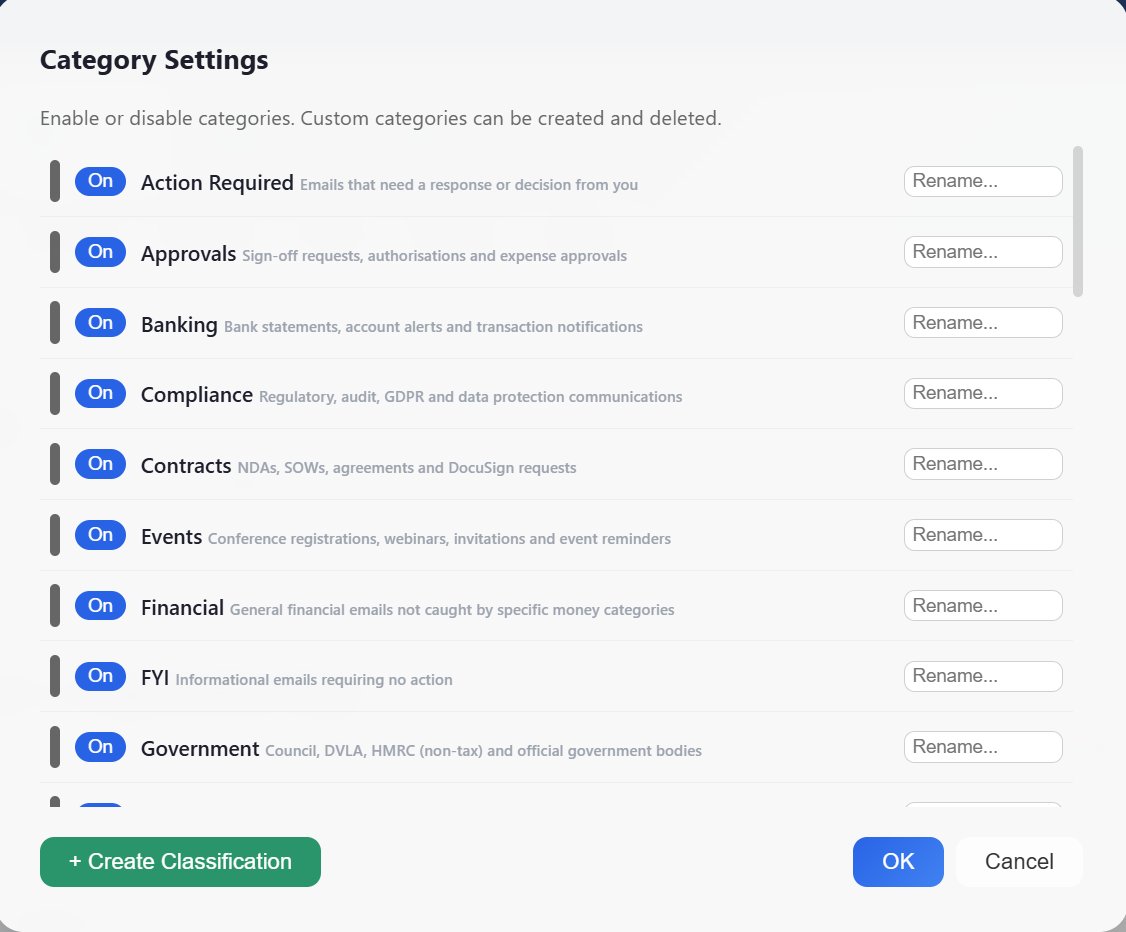
Action Required, Approvals, Banking, Compliance, Contracts, Events, Financial, FYI, Government and more — twelve business categories ready out of the box. Rename them, disable them, or create your own classifications to match how your inbox actually works.

  • Twelve business categories included
  • Custom classifications you define
  • AI-assisted folder suggestions
  • Per-category enable/disable toggles
Category settings panel showing business categories
User Control

Your inbox, your rules

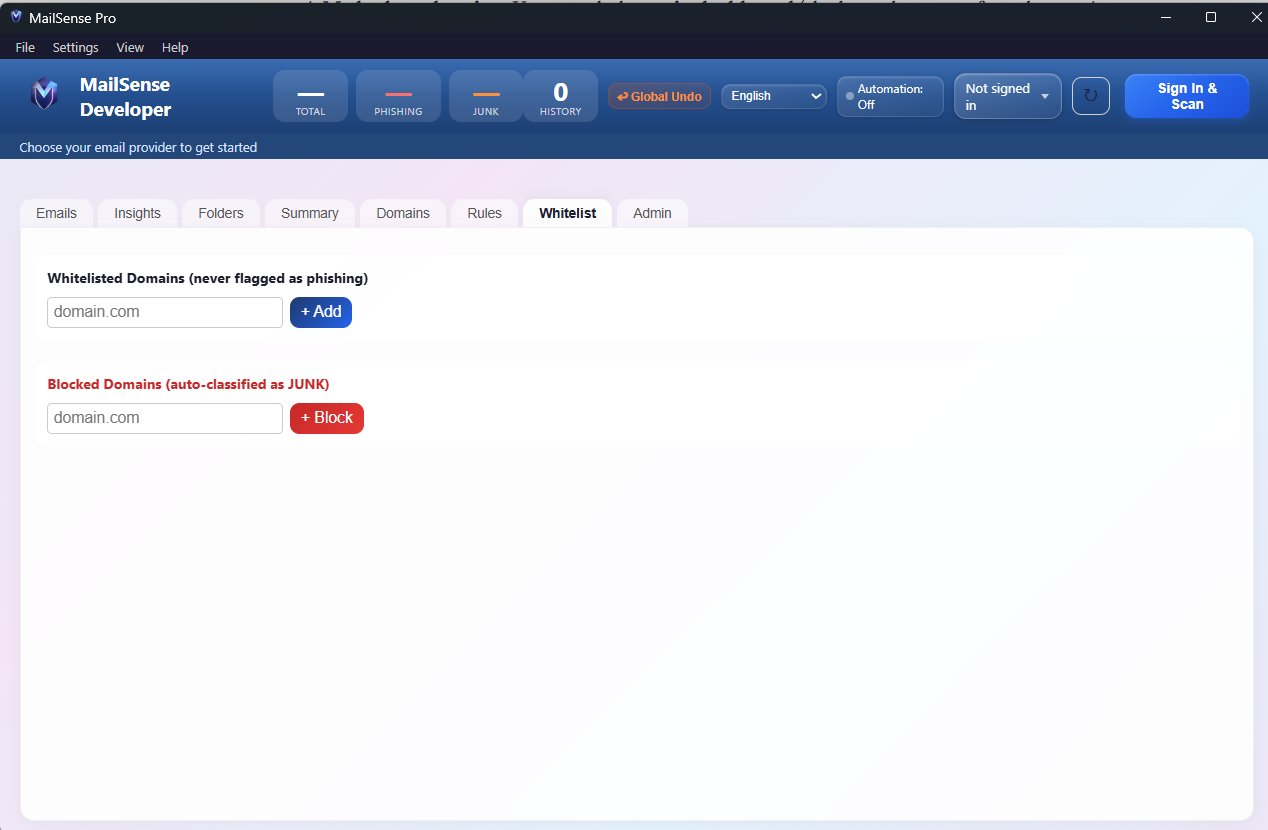
Whitelist domains you trust. Block domains you don't. Build automation rules. Run them on demand or on schedule. Nothing is automatic without your permission — and every action can be reverted.

  • Domain whitelist and blocklist
  • Custom rule builder with manual run option
  • Global undo at any point
  • Configurable automation — off by default
Whitelisted and blocked domains panel
Multi-provider

One tool. Every inbox.

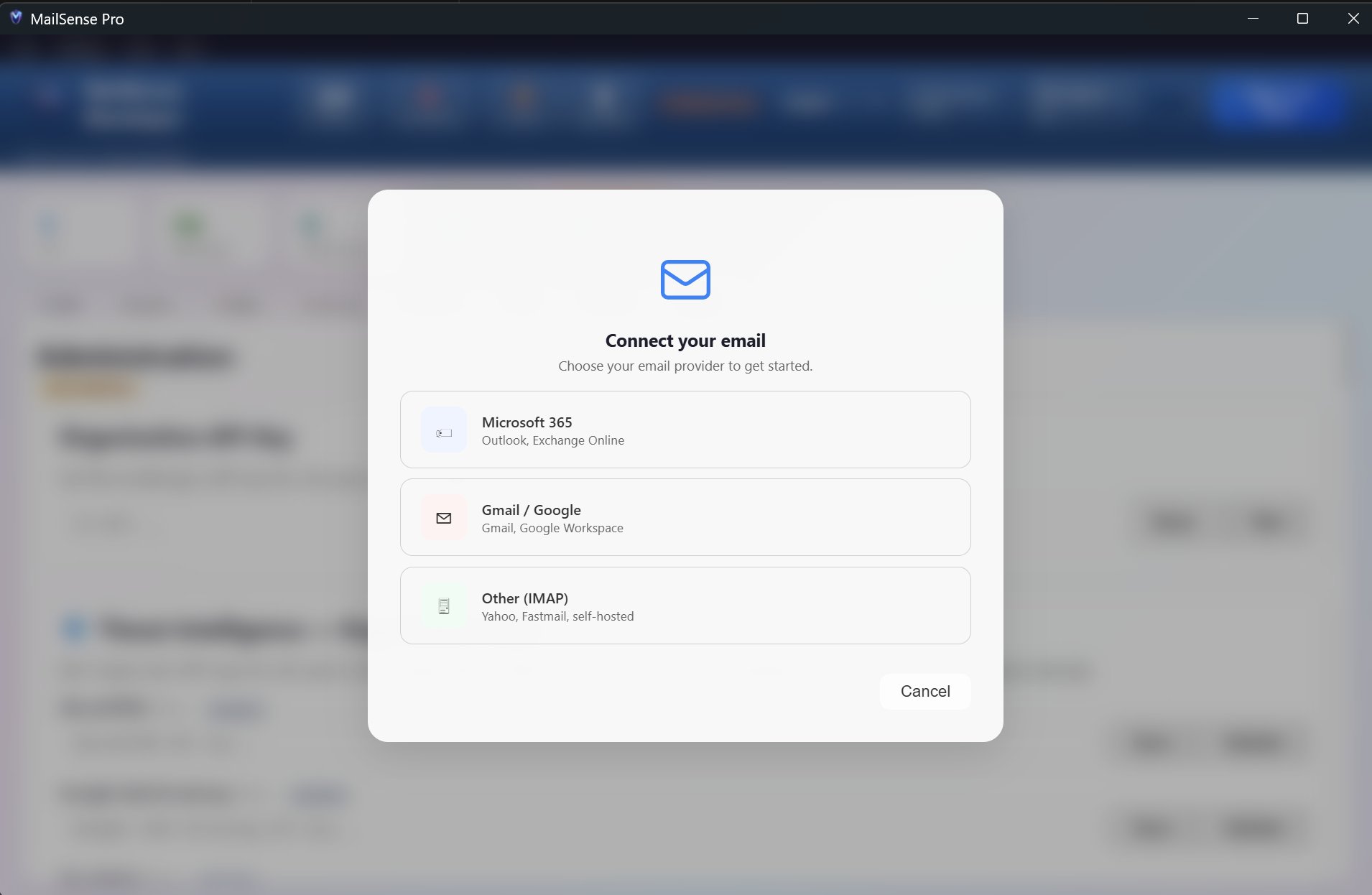
Connect Microsoft 365, Gmail, and any IMAP-compatible provider in seconds via OAuth or app password. Switch between accounts, or analyse them in parallel. The first email security tool that doesn't lock you in to a single provider.

  • Microsoft 365 / Outlook / Exchange Online
  • Gmail and Google Workspace
  • IMAP — Yahoo, Fastmail, self-hosted
  • Multi-account management
Email provider connection screen

The endpoint analyser email has been missing

Every gateway tool decides for you what reaches your inbox. None of them shows you why.

Gateway tools — Defender, Gmail filters

Filter at the perimeter

Server-side scanning that decides what reaches your inbox. Once an email lands, you have no forensic tool to inspect it. Vendor-locked: M365 Defender works only on M365, Gmail's filter only on Gmail.

Think antivirus, not firewall. Nobody runs a firewall and skips antivirus. Email security works the same way: gateway filtering protects the perimeter, endpoint analysis protects the user. MailSense Pro is the second layer — the one most people don't have yet.

Built for individuals, SMEs, and regulated industries

Three tiers, designed around how you use the product — not how big your IT budget is. Pricing on request during pre-launch.

Capabilities Free For personal email security Pro For power users & SMEs Enterprise For teams & regulated industries
Email forensics & trust scoring
Open threat feeds (Phishing.Database, Spamhaus)
BEC, QR phishing & lookalike detection
API-key feeds (AbuseIPDB, Google Safe Browsing, VirusTotal)
AI recommendations (Claude tier-routed)
Multi-account management 1 account 3 accounts Unlimited
SIEM export (8 platforms)
JSONL audit trail
Priority support Email Email + dedicated
Contact Sales Contact Sales Contact Sales

Frequently asked

How is MailSense Pro different from Microsoft Defender or Gmail's built-in filter?
Defender and Gmail filter at the gateway — they decide which emails reach your inbox. They don't show you why. MailSense Pro analyses at the endpoint, after delivery: full sender verification, relay chain, raw headers, and AI-reasoned classification. It also works across providers — Defender is Microsoft-only, Gmail's filter is Google-only. Use both: gateway for blocking, MailSense Pro for forensics on what gets through.
Where does my email data go?
Email contents stay on your machine. AI analysis is performed by sending only the metadata required (sender, subject, header info) to Anthropic's Claude API — body content is included only when you explicitly invoke deep analysis on a specific email. No third-party tracking, no analytics SDKs, no data resold. The audit trail logs locally as JSONL.
Which email providers are supported?
Microsoft 365 (Outlook, Exchange Online), Gmail and Google Workspace, plus any IMAP-compatible provider — Yahoo, Fastmail, ProtonMail Bridge, self-hosted servers, and others. Connection is via OAuth where supported, or app passwords for IMAP.
Do I need API keys to use it?
No. Phishing.Database (GitHub) and Spamhaus DNSBL work automatically without any keys. Add AbuseIPDB, Google Safe Browsing and VirusTotal keys (all available on free tiers) for the full intelligence stack. The Free tier is fully functional out of the box.
What's the company behind it?
Meadowlarktech Ltd — a UK-registered company (Companies House No. 11369562). Code is signed with an EV certificate. SAST and DAST hardened, with zero High findings on the latest scans.

Be first when we launch.

MailSense Pro is in final pre-launch stages. Join the early access list to be notified the moment we're live — or talk to our team about an enterprise pilot.